- Connect directly between devices without manual network configuration
- Reduce latency by avoiding servers when possible
- Save bandwidth by keeping data transfer peer-to-peer
- Improve resilience and reliability by not depending on all traffic being routed through third parties
The Problem: NATs and Firewalls Block Direct Connections
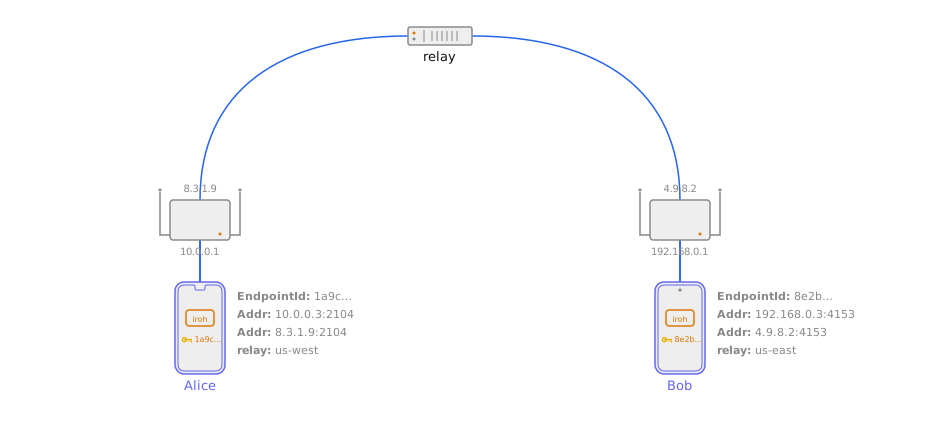
Imagine you’re trying to connect two devices directly, both sitting behind home or office routers. The routers’ firewalls block incoming connections because they don’t recognise them as responses to outbound traffic. The combination of NAT (which translates addresses) and firewall rules (which filter traffic) makes direct connections challenging. Most home and office networks use NAT, which acts like a one-way door: devices inside the network can reach out to the internet, but the internet can’t easily reach back in. This causes reliance on central servers, which can introduce latency and reliability issues. Traditionally, this problem was solved by:- Port forwarding: Manually configuring your router to allow specific connections (tedious and requires technical knowledge)
- Relay servers: Routing all traffic through a third-party server (slow and expensive)
How NAT Traversal Works in iroh
iroh’s NAT traversal is built on top of QUIC and integrates tightly with the relay system. The core technique is simultaneous outbound connection (sometimes called “holepunching”) where both peers send packets to each other at the same time, causing their respective firewalls and NATs to create mappings that allow the traffic through. Note that despite the “NAT” in the name, this technique applies equally to firewalls that don’t involve NAT. iroh uses it whenever a direct connection needs to be established through any restrictive network boundary. NAT traversal succeeds in the vast majority of real-world conditions; roughly 9 out of 10 network configurations allow a direct connection to be established. iroh’s implementation is deterministic: if it works between two devices once, it will continue to work as long as their networking setup stays stable. Where it fails (some corporate firewalls or cellular networks) iroh automatically falls back to the relay.1. Initial Contact Through a Relay
Both peers first connect to a shared relay server. The relay acts as a meeting point where peers can coordinate before a direct path is established. The relay server observes each node’s public IP address and port (the address from which it sees incoming traffic). This reflective address can be used by the remote peer to reach through the firewall, provided the firewall considers it expected traffic.2. Sharing Connection Information
Through the relay, peers exchange their:- Public IP addresses (how they appear to the outside internet)
- Port numbers (the specific door number the router assigned them)
- Local addresses (in case they’re on the same network)
3. Simultaneous Outbound Connection
Both peers try to connect to each other at the same time. When peer A sends a packet to peer B’s public address, A’s NAT creates a mapping and the firewall creates a temporary rule allowing responses from B. When peer B sends a packet to peer A at the same moment, B’s NAT and firewall do the same. Because both mappings are now established and both firewalls expect traffic from each other, the packets get through and a direct connection is formed.