
EndpointId.
An endpoint publishes a signed record that maps its EndpointId to its home relay
URL (and optionally its direct addresses), and resolves the same kind of record for
endpoints it wants to dial.
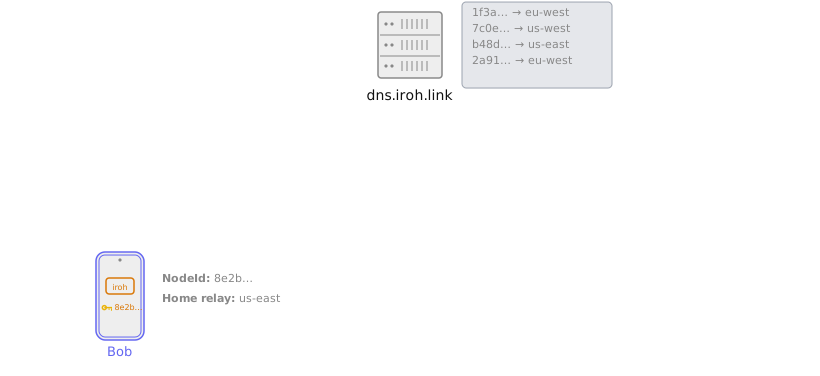
How records are published and resolved
Each endpoint creates a set of records with its addressing information, and puts it into a signed Pkarr packet. The packet is signed by the endpoint’s secret key. The endpoint publishes this packet to a DNS/Pkarr server via HTTP. Other endpoints can then resolve these packets either via DNS queries or via HTTP. Number 0 provides a set of public DNS/Pkarr servers that are free to use, and are configured by default. You’re more than welcome to run production systems using the public relays if you find performance acceptable. The public servers do rate-limit traffic, there is no guaranteed uptime. If you need more capacity or uptime guarantees or SLAs, you can run your own DNS server, or contact us about hosted DNS options. You can read more about the design of the DNS/Pkarr address lookup system on the address lookup page.Using DNS address lookup
DNS address lookup is part of thepresets::N0 defaults, so you do not need to enable
it explicitly. The N0 preset adds a publisher and a resolver, both pointed at the
n0-hosted server at dns.iroh.link.
To discover another endpoint over DNS you need its EndpointId, either directly
or from a ticket that contains one. Resolution then happens
automatically when you connect.
Use your own server
Two endpoints must publish to and resolve from the same server to find each other. To use your own deployment ofiroh-dns-server, build the endpoint
from presets::Minimal (which adds no address lookup) and configure the publisher and
resolver yourself.
PkarrPublisher::builder takes the relay URL to PUT records to.
DnsAddressLookup::builder takes the origin domain to query under.
PkarrPublisher publishes only the home relay URL, not direct IP
addresses. To publish addresses as well, set an AddrFilter on the builder with
PkarrPublisher::builder(url).addr_filter(AddrFilter::unfiltered()).
Disable DNS address lookup
DNS address lookup is optional. To build an endpoint without it, usepresets::Minimal
instead of presets::N0. Minimal sets up a crypto provider but adds no
address lookup and no relays, so the endpoint is not published anywhere.